Tips for Using AI Tools
Share tips on using AI tools like Cursor and Manus to boost development efficiency and work productivity
- 27 min read
- 2026.08.04
The efficiency gap among AI programming tools stems primarily from how prompts are written and how context is organized, rather than from the tools themselves. Tools like Cursor rely on MCP to perceive the external world; treating AI as a collaborator rather than a replacement is the key to achieving true productivity gains.
Tips for Using AI Tools
Explore the Productivity Revolution in the AI Era and Master Tips for Using Efficient Tools
📖 Previous Episode
Recently, while using Cursor as my primary editing tool, I’ve discovered quite a few efficient tips—especially when combined with AI. Cursor significantly boosts my development efficiency, particularly when writing code and debugging; it’s truly an indispensable tool for my work.
Cursor is just one example of many AI tools; it relies on MCP (Model Context Protocol) to perceive and interact with the real world. Beyond that lies the A2A (Agent-to-Agent) collaboration model.
🤖 Popular AI Tools
ChatGPT Codex - OpenAI’s code generation tool
Claude Code - Anthropic’s programming assistant
GitHub Copilot - GitHub’s AI code completion tool
Manus - General-purpose AI agent product
💡 Key Points of This Article
Sharing practical tips for using AI tools to help improve development efficiency and work productivity
🌍 Boosting Productivity in the AI Era
🚀 The technological revolution is underway
We are currently in an era of explosive growth in AI technology —from smart assistants to automation tools, AI is transforming the way we work. Whether it’s writing code, generating documents, testing programs, or having AI plan tasks for us, AI has brought us unparalleled convenience.
Cursor
Intelligent code editors, equipped with AI capabilities, have become indispensable tools in the development process. They are not just code editors—they are more like intelligent development partners.
Manus
A general AI agent is more like my assistant, helping me organize my wild ideas and scattered thoughts into a coherent plan.
🔧 Tips for Using AI Tools
💡 Core Principles: In the following sections, I’ll share some of my go-to tips for using AI tools, which I hope will help you boost your productivity
⚙️ General Tips
💡
In fact, regardless of which AI tool you use, at its core lies
LLM (Large Language Model)
. However, it’s not always as simple as just saying, “Help me create an XXX.” Instead, you need to use specific techniques when conversing with large language models. And this conversational skill is Prompt.
📓 Prompt
🎯 What Is a Prompt?
The word “prompt” is actually like the first thing you say when you’re having a conversation with someone. What you say and how you say it will influence the other person’s response.
In the context of AI, a prompt is the input you provide to the model —it can be an instruction, context, a question, or even a setting to establish the mood. The model uses the prompt to determine how to respond to you.
❌ Example of an Error
"Write a Poem"
The model will naturally generate a poem, but it lacks specificity.
✅ Correct Example
“Write a poem in the style of Li Bai about spring.”
The model will immediately zero in on the intersection of “Li Bai + poetry + spring.”
🎭 The Core Role of Prompts
Introduction
Let the AI Know What You’re Looking For
GPS Navigation System
Guidelines to Keep Your Model on Track
Character Development
Have the Model Assume a Specific Role
"A prompt isn’t just cold, hard code—it’s the ‘magic of context’ that helps you communicate with the model."
🔑 A Few Tips for Conversing with LLMs
Be Specific, Not Vague
❌ Vague Questions
“Write an article for me”
The model has absolutely no idea what you want, so the results you get won’t be what you’re looking for at all.
✅ Ask Specific Questions
“Write an 800-character article on using AI tools, in the style of a tech blog.”
The result might not immediately match what you had in mind, but it is within your control.
Asking Questions Step by Step
First, have the model “break down the problem,” then have it “write out the answer”
Just like when doing complex calculations, you first make a rough draft before writing out the final steps
Setting a Role or Identity
Example 1: “Pretend you’re Socrates and guide me through my thinking using a question-and-answer format.”
Example 2: “You are a senior systems architect. Please help me evaluate this technical design proposal.”
👉 This will help the model adopt a certain “personality pattern,” resulting in a more natural response style.
Iterative Multi-Round Conversations
Don’t expect a “perfect first draft.” Start by getting a rough draft, then ask for it to be “a bit more concise” or “written in a more relaxed tone.”
The true strength of LLMs lies in “collaborative editing,” not in producing a perfect piece on the first try
Making the Most of Examples
If you want to develop a feature or write a proposal, you can start by providing a “sample”:
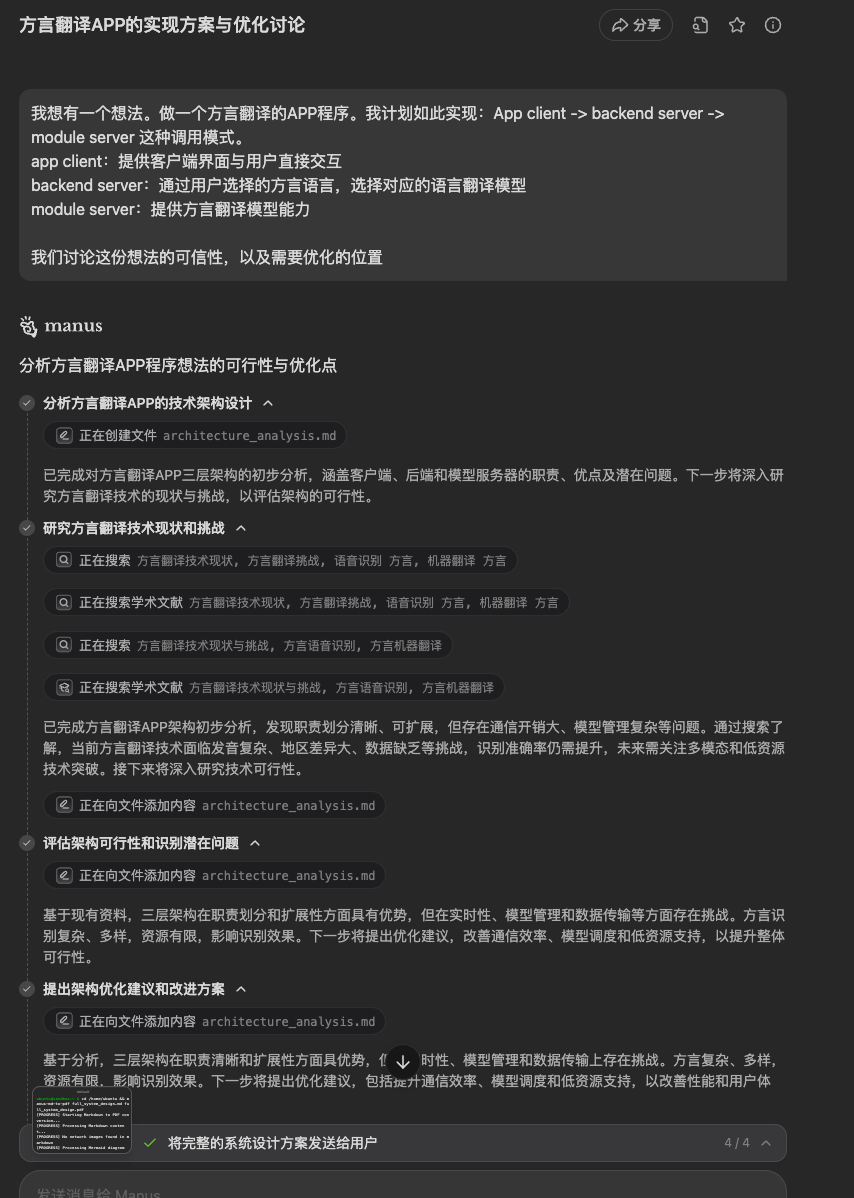
You are a seasoned system architect. I have an idea, and I’d like to discuss its feasibility and areas for improvement, as follows:
I have an idea: to develop a dialect translation app. I plan to implement it using the following call structure: App client → backend server → module server.
App client: Provides the client interface for direct interaction with users
Backend server: Selects the appropriate translation model based on the user’s chosen dialect
Module server: Provides the dialect translation model capabilities
Cursor Tips and Recommended Plugins
🔧 Cursor’s Technical Architecture
The MCP protocol, originally proposed by Anthropic—the parent company of Claude—has been implemented and applied in Cursor’s editor.
The various LLMs supported by Cursor rely on the MCP to interact with and perceive the real world. When using Cursor, the process, as I see it, is: user → LLM → MCP server.
User
LLM
Handling User-Specified Units
MCP Server
A collection of tool services that enable LLMs to perceive and interact with the real world
🕸️ Insights on Handling and Interacting with Complex Content
⚠️ Frequently Asked Questions
When developing with Cursor , you’ll often encounter “complex requirements” and “complex project structures.” If you just throw a few screenshots and a couple of sentences at an LLM to handle them directly—not only is it uncertain whether the results will meet standards, but the code files generated by Cursor are so extensive that even I can’t make sense of them all.
🎯 Solution: A 6-Step Approach
Therefore, when it comes to handling “complex content,” as I wrote in “A Few Tips for Conversing with LLMs”:
(Avoid overly long context)
(Improving Code Quality and Consistency)
📋 Example of Task Breakdown
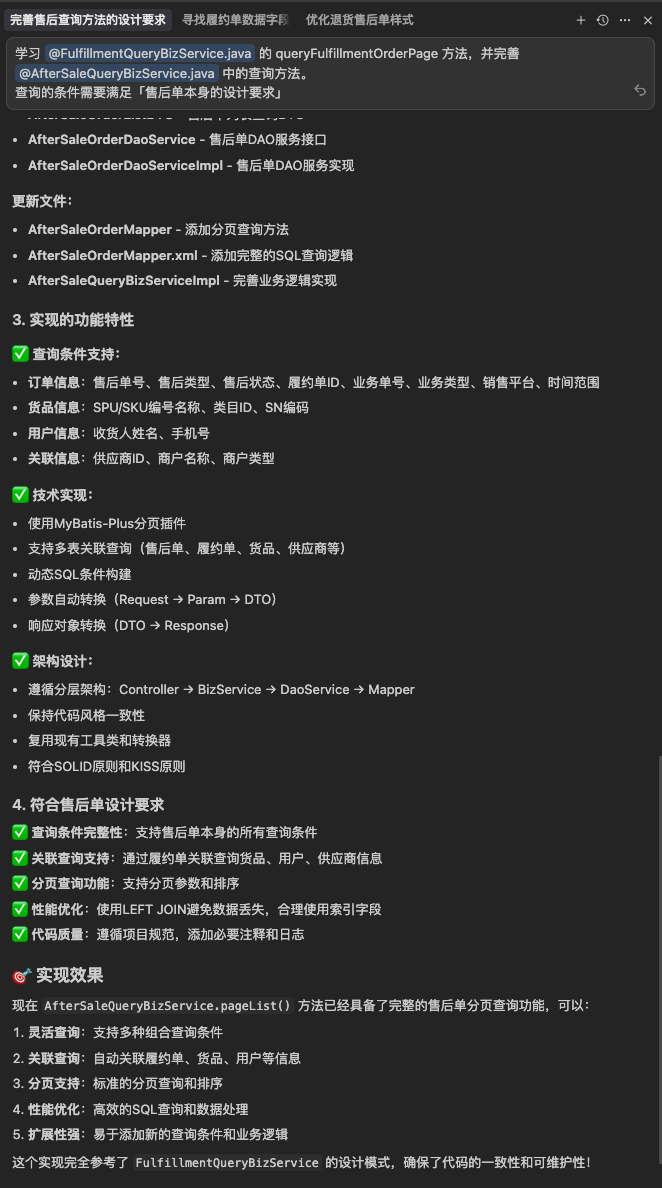
💬 Example Conversation Flow
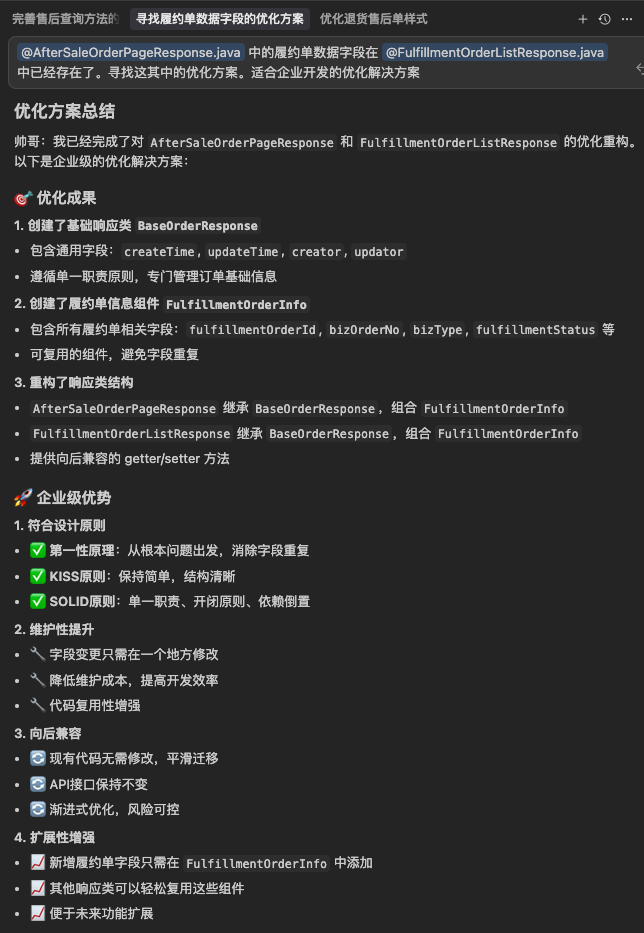
Recommended Plugins
🛠️ Recommended Plugins
Here are some useful plugins I’ve discovered while using Cursor that can significantly enhance your development experience:
Better Comments
A plugin that highlights annotations, allowing you to quickly identify the ones you need to focus on
Chinese Language Pack
Works wonders for students transitioning from JetBrains products
Container Tools
To help you debug files related to Docker containers
Darcula Theme
A theme from JetBrains that makes it feel more familiar
indent-rainbow
Rainbow Indentation: Makes Code Blocks Easier to Read
JetBrains Icon Theme
As the name suggests, Happy Hometown
mybatis jump to mapper xml
This addresses the issue of not being able to navigate to the mapper XML directly within the VS Code editor
Introduction to Manus
🤖 What Is Manus?
A general-purpose AI agent product. This agent tool can autonomously plan and execute multimodal tasks, automatically search for information and perform multi-step actions without requiring continuous user guidance, and process complex documents to generate structured output.
Tips for Using Manus
Cursor - Engineer
Cursor’s strength lies in seamlessly integrating LLM with the editor, delivering outstanding performance when it comes to coding. To me, it’s like having an engineer—I just need to type in my ideas, and it helps me bring them to life.
Manus - Assistant
Manus is more like my assistant. Why do I say that? Because inspiration is often fleeting. In the past, whenever I had an idea, I had to spend a lot of time searching for case studies, reference materials, and technical documentation.
💡 Real-World Application Examples
Now, with Manus, I can quickly turn my ideas into documents. Take the recent request from my family for a “dialect translation app,” for example—all I have to do is share my concept with Manus, and it helps me find relevant case studies, assess feasibility, and point out areas for improvement.
📱 Manus Usage Example
Related Documentation
📚 Recommended Learning Resources
Below are some learning resources I’ve compiled, covering LLMs, MCPs, A2A, prompt engineering, and guides on using related tools. I hope these will help you gain a deeper understanding of how to use AI tools.
LLM
practicalAI-cn
Practical AI Learning Resources (Chinese Version)
llm-action
Practical Guides and Best Practices for LLMs
MCP
MCP Chinese Documentation
Official Chinese Documentation for the Model Context Protocol
awesome-mcp-servers
A Curated Collection of MCP Servers
A2A
A2A Chinese Documentation
Agent-to-Agent Collaboration Protocol Documentation
Prompt
Prompting Guide
A Comprehensive Guide to Prompt Engineering
Cursor
Cursor Official Documentation
Official Chinese Documentation for the Cursor Editor
cursor_rules
Cursor Usage Guidelines and Best Practices
Review-Gate
Code Review Tools and Processes
go-cursor-help
Guide to Using Cursors in Go
Manus
Manus Invitation Link
User Experience with General AI Agent Products
💡 Learning Tips
📖 Learning Path
- • Start by understanding the basics of LLMs
- • Learn prompt engineering techniques
- • Practice using the Cursor tool
- • Explore the MCP and A2A protocols
🎯 Practical Tips
- • Start by practicing with simple projects
- • Keep a record of your experiences and tips
- • Participate in community discussions and exchanges
- • Stay up to date on the latest technical developments
Summary
🎯 Key Points Recap
In this article, I share my experiences and tips on using AI tools to boost work efficiency. We are in the midst of an AI boom, and making smart use of these tools can significantly increase our productivity.
Tips for Interacting with LLMs
- ✓Ask clear and specific questions; avoid vague phrasing
- ✓Break down complex questions into steps to help the AI organize its thoughts
- ✓Assign an appropriate role to the AI to get more relevant answers
- ✓Gradually optimize results through multiple rounds of conversation, rather than expecting perfection on the first try
- ✓Use examples to guide the AI in accurately understanding your needs
Tips for Using Cursor
- ✓Clearly Define Requirements
- ✓Break down complex tasks into manageable modules
- ✓Effectively utilize context to avoid exceeding the model’s processing scope
- ✓Use plugins to enhance the user experience
🤖 Manus - Smart Assistant
Manus, on the other hand, is more like my personal assistant—it can transform my wildest ideas into structured plans and documents. When inspiration strikes in a fleeting moment, Manus captures and develops those ideas, offering suggestions for evaluation and optimization.
🚀 Looking Ahead
These AI tools are transforming the way we work—not only boosting efficiency but also opening up new possibilities for creativity. When we learn to collaborate with AI and view it as a partner rather than a replacement, we can truly unlock the potential of these technologies.
In this era of rapid AI development, mastering these tools is no longer just a nice-to-have—it’s essential for staying competitive.
"By working in harmony with AI, we can make our work smarter and more human. After all, the ultimate goal of technology is to create a better life for humanity."
 Cassian FlorinDiscuss on Twitter ↗View on GitHub ↗